Triton deletes a level
Lesson 1 · mission: understand the GPU execution model · the diagram, re-drawn for Triton
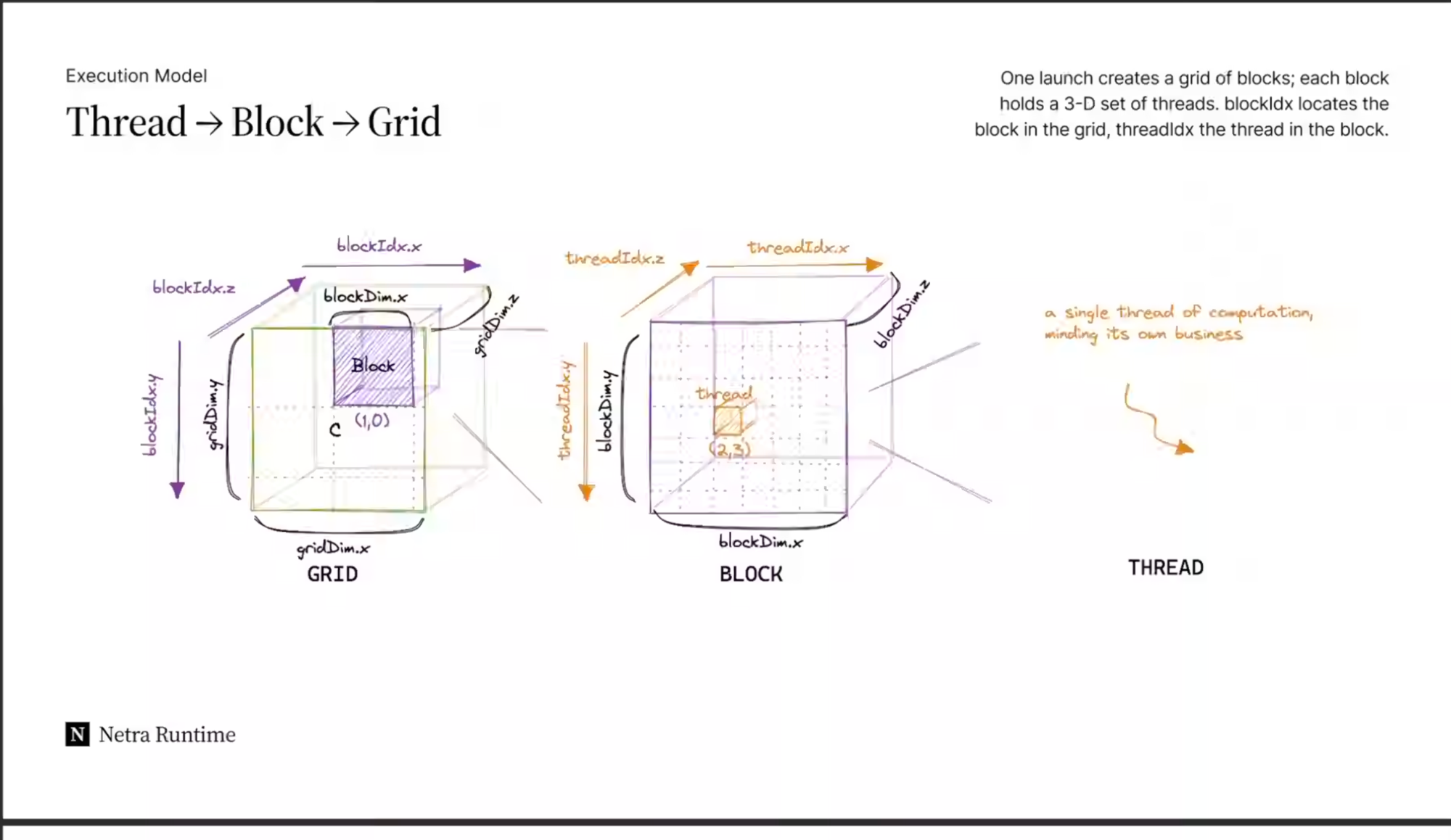
The diagram you shared is the CUDA execution model: three nested levels —
a GRID of BLOCKS, each block a 3-D set of
THREADS. CUDA asks you to write code from the point of view of
one single thread, which figures out which data element it owns using
blockIdx and threadIdx.
Triton keeps the grid and the block. It deletes the thread from your code. You write one program that owns a whole block of data at once. That is the entire idea of this lesson — everything below is detail.
The three levels, in one breath
| Level | In the diagram | What it is |
|---|---|---|
| GRID | the big outer cube, gridDim.{x,y,z} | All the work for one kernel launch. |
| BLOCK | the small purple cube at (1,0), blockDim.{x,y,z} | A group of threads that can share fast memory and synchronize. |
| THREAD | the tiny orange cell at (2,3) | "A single thread of computation, minding its own business" — processes one scalar. |
CUDA vs Triton: who writes what
CUDA — you are one thread
- Your code runs once per thread.
- You compute your element:
i = blockIdx.x*blockDim.x + threadIdx.x. - You manage shared memory,
__syncthreads(), coalescing, vectorization — by hand. - Mental unit: a scalar.
Triton — you are one program
- Your code runs once per block (called a program instance).
- You compute your block's range of elements with
tl.program_id(0). - The compiler does shared memory, sync, coalescing, vectorization for you.
- Mental unit: a tile (a small array).
OpenAI's own words: Triton revisits the SPMD model and proposes "a variant in which
programs — rather than threads — are blocked." Kernels are "launched concurrently with
different program_id's on a grid of so-called instances."
(Introducing Triton, OpenAI)
The vocabulary map
| CUDA (the diagram) | Triton | Note |
|---|---|---|
blockIdx.x | tl.program_id(axis=0) | Which block/program am I? (Literally reads blockIdx.x in the compiled PTX.) |
gridDim.x | the launch grid tuple | How many programs were launched. |
blockDim.x | BLOCK_SIZE (a tl.constexpr) | How many elements one program owns — set by you, tuned by autotuner. |
threadIdx.x | — none — | There is no thread index in Triton. The compiler owns the threads. |
See it in the canonical first kernel
Vector add: output = x + y. Watch how every line is about the block, never a thread.
Listen first: this kernel adds two arrays one block at a time. It reads its
program id into pid — that is which block it owns, the rough equivalent of
blockIdx.x. It computes block_start as pid times
BLOCK_SIZE, the first element this block owns. Then offsets is
block_start plus a range from zero up to BLOCK_SIZE — a whole tile of
indices rather than one. The mask keeps only offsets still below n_elements,
guarding the ragged last block. It loads the x and y tiles under that mask,
adds them in a single operation over the whole tile, then stores the result tile back.
Source (official tutorial): Triton · Vector Addition↗
Listen first: this is the launch, not the kernel. grid is a small
function that returns how many programs — blocks — we need: the number of elements divided by
BLOCK_SIZE, rounded up with triton.cdiv. Then add_kernel is
launched over that grid, passing the three buffers, the element count, and a BLOCK_SIZE
of 1024.
The tells that you're at the block level, not the thread level:
tl.arange(0, BLOCK_SIZE)— you build an array of offsets, not a single index.output = x + y— one line adds 1024 elements at once. In CUDA this would be one scalar add, run by 1024 separate threads.mask— because a program owns a fixed-size tile, the last (ragged) block masks off the overflow. This is the price of thinking in tiles.
Micro-world: launch the grid yourself
The three lines that trip everyone up are pid, offsets and mask.
Drive them. Pick a buffer size, pick a BLOCK_SIZE, and watch which program owns which elements —
then take the mask away and watch what breaks.
Grid launch & the ragged last block
Each coloured cell is one element of the buffer. Each group of cells is one program instance. Click a program to see its actual values.
selected program real element masked off out-of-bounds access
- Start with n_elements = 32, BLOCK_SIZE = 8. Four programs, eight elements each, an exact fit. Now untick the mask — nothing bad happens. This is exactly why the mask looks like bookkeeping noise.
- Now drag n_elements down to 26 and leave the mask off. Same kernel, same launch, and the last program is now writing six elements past the end of your buffer. That is a memory stomp, and on a GPU it will not politely crash.
- Tick the mask back on. Same six lanes, now disabled. The mask is not defensive programming — it is the price of a program owning a fixed-size tile.
- Watch the program count as you cross 24 → 25 with BLOCK_SIZE 8. One extra program appears to cover a single element, and drags seven phantom lanes in with it.
- Click program 0, then the last program. Identical code, identical
BLOCK_SIZE— onlypidand thereforemaskdiffer. That is SPMD.
Check yourself
"But surely the threads still exist?" Yes — on the hardware.tl.program_id(0)compiles down toblockIdx.x, and the tile becomes many threads. The point is they're absent from your source code: the compiler does coalescing, thread swizzling, shared-memory allocation/synchronization, vectorization and tensor-core scheduling for you. (Triton docs)
CUDA = write code for one thread that grabs one element via
blockIdx+threadIdx.
Triton = write code for one program instance that grabs a whole tile via tl.program_id;
there is no threadIdx, and the compiler manages the threads.
Read next
- Reference: CUDA ↔ Triton glossary & cheat-sheet (keep this open)
- Lesson 2 — Inference is the half you pay for forever — why vector add is a memory-bound kernel, and what that means for every kernel you write.
- Later: tiles & masks — why a program owns a fixed-size block and how the mask protects the edges.
Primary source
Read Introducing Triton (OpenAI) — ~10 min. Stop at the line about "programs — rather than threads — are blocked"; that one sentence is this whole lesson.
💬 I'm your teacher for this — ask me followups any time. Confused about why a "program" becomes "threads" on the GPU, or what a tile really is? Ask, and I'll build the next lesson around it.
Lesson 1 · Zain's AI Inference Lab · mission: understand the GPU execution model via Triton